Feb 9, 2023·2 min read
I bet you’re a UX designer but you didn’t know about this ...
Tiny details in your designs make all the difference. You are no stranger to this fact. Lemme tell you about one such detail that might have escaped your attention.
I’ll tell you what I’m talking about, just quickly click on any kind of dropdown menu on your browser or just click on “File” on any software you’re using. You’ll notice that some options have an ellipsis (…) at the end and others don’t.
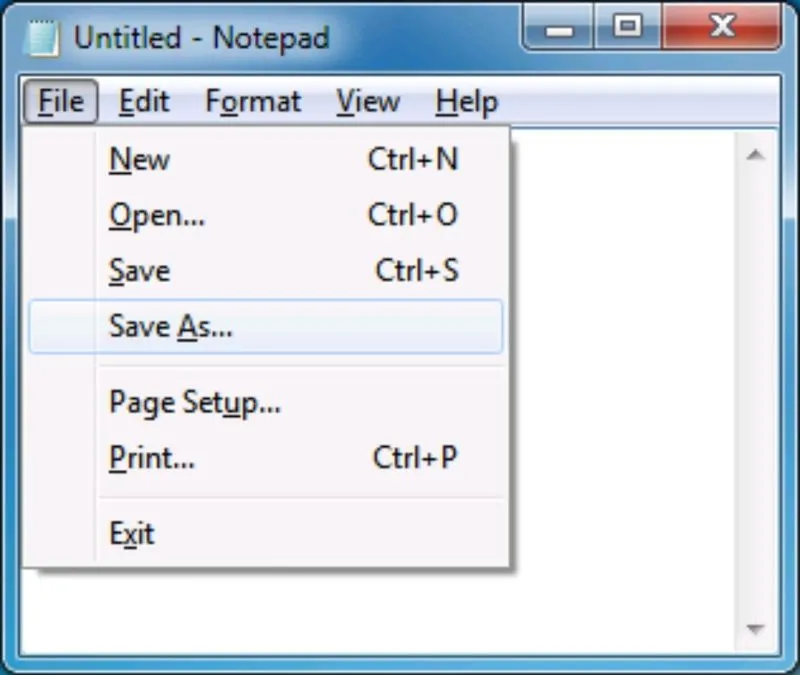
Never noticed? Well, get ready for a little lightbulb moment because this tiny symbol actually packs a punch!
An ellipsis is like a secret code between you and the user.
It signals to them that there’s more to the story. It’s like saying “hang on, there’s another step coming up.” So, when you see an option in a dropdown menu with an ellipsis, it means there’s a continuation and another dialog box or step before the action is complete.
Think about it — Save is usually without an ellipsis because it’s a quick and simple action, but Save As is followed by an ellipsis because there’s a dialog box that needs to be filled out before the file can be saved.
Cool, right?
As a UX designer, you can use this knowledge when designing web apps or software. Adding an ellipsis wherever needed can guide the user and make their experience smoother and more intuitive. It’s just a good UX practice. Trust me, your users will thank you! (Although, most of them don’t even know what this means, so… what do I know!)
If you found this article helpful, check out the book 101 UX Principles by Will Grant, where I first learned about it. It’s a great collection of small tips that can help you improve the UX of any kinda product.
That’s all for this week. I hope you have a great day and keep building amazing products.